Summary: Why We Recommend It
We have now been using this system for a month and think it is easily the best smart lock out there for UK users right now.
It works well every time, is super compatible with a range of doors and services, and looks great. Pricing: The starter packs come in two different sizes depending on your front door thickness at £260, making them the same price as the Yale Connexis options currently available.
What Is Ultion Nuki?
The Ultion Nuki is a partnership between lock company Ultion and smart lock manufacturer Nuki. This product has been designed with UK multipoint door home owners in mind and functions really as three products combined.
The Ultion side of the partnership provides a new, super-secure cylinder lock for your front door along with a beautifully crafted interior handle that is designed to seamlessly fit the standard Nuki 3.0 frame. The Nuki side brings the core functionality of their Nuki 3.0 HomeKit compatible smart lock.
Pricing and Accessories
The starter packs come in two different sizes depending on your door thickness for a total cost of £260, which is identical to current pricing found with Yale Connexis equivalents out there at the moment. For that same price point you receive the handle assembly along with the new cylinder and Nuki 3.0 unit.
Out of the box setup includes HomeKit compatibility built in for your devices immediately if you have an Apple device acting as a home hub such as a HomePod mini or Apple TV, then out-of-home access via the app on iPhone also works straight away from there without needing anything else added initially. For Android users who wish to use this lock with Alexa or Google Assistant alongside those wanting to have out-of-home access through the dedicated Nuki application you will require additional hardware that connects your devices properly.
Design and Specifications
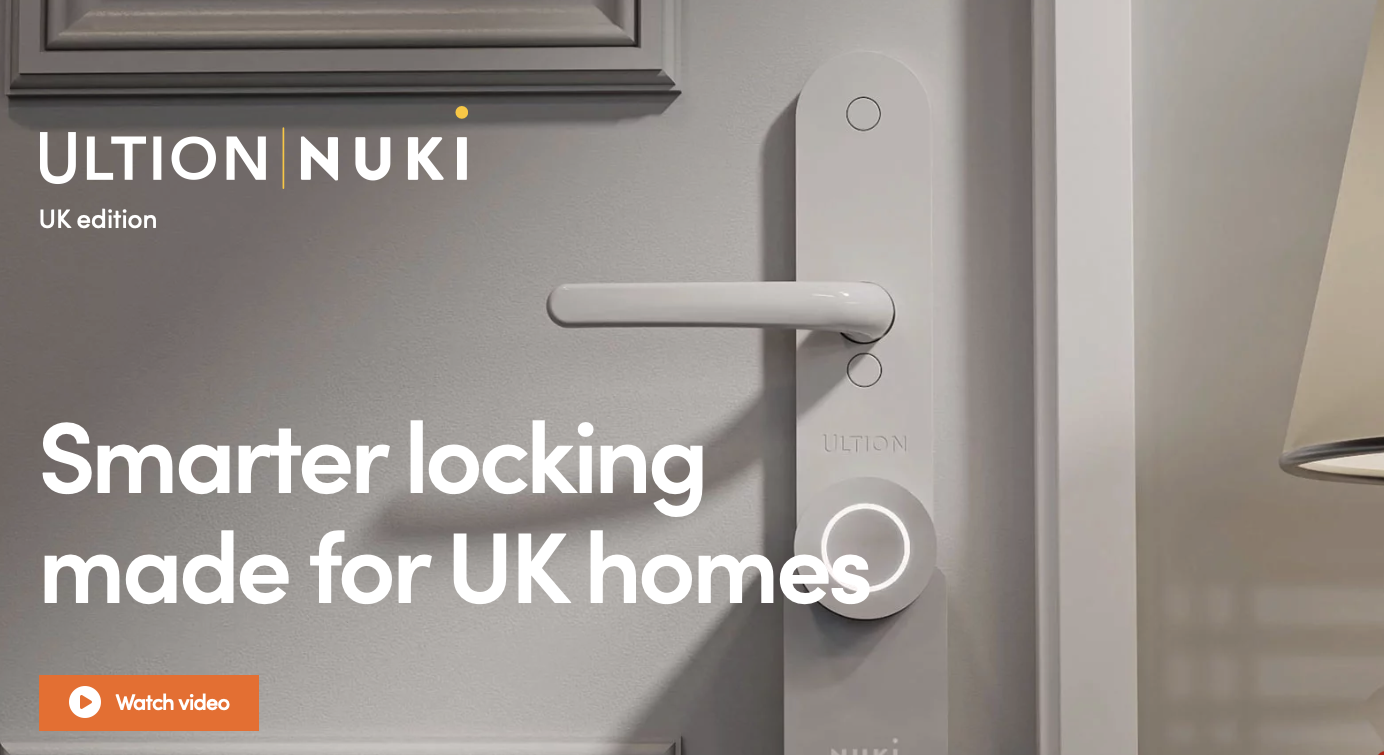
The Ultion Nuki has been designed specifically to look great as a combined smart-lock handle combination unit on any door it is mounted upon. The exterior handle looks beautifully crafted while the lock itself appears modern looking, white box style with indicator light included plus manual twist area for physical operation needs.
We think this aesthetic works well especially when installed against standard white front doors that many homeowners have in UK properties currently. When it comes to specific specifications the Ultion Nuki is designed primarily around working with lift-to-lock multipoint doors common across United Kingdom homes generally speaking today.
The Nuki 3.0 unit itself connects via Bluetooth version 5 and maintains data encryption secure enough to rival online banking security levels which ensures safety for your home network environment always. Official manufacturer claims state battery life from the included four AA batteries will be six months but this varies depending on usage intensity significantly over time.
After just one month of regular use we have only used up about ten percent total power so hoping to get more runtime before needing replacement eventually! Nuki sell an optional rechargeable battery pack too for roughly £49 if standard alkaline cells are not your preference choice style. One thing users might like is that outside appearance remains exactly the same while it can still be operated via key directly on door handle itself.
Installation Process
The beauty of having a brand new interior handle included in the box makes installing the Ultion Nuki very simple indeed for most homeowners attempting DIY setup at home right now. Essentially, you remove your existing inner handle along with cylinder lock from front door frame and replace them directly with this all-in-one smart replacement unit.
The Nuki 3.0 then sits perfectly in its mount located on the backplate of new hardware once installed completely correctly during assembly steps shown online clearly enough that video instructions take less than a minute to follow fully generally speaking now without needing any special tools besides standard drill bits if holes need adjusting slightly bigger for your specific door frame measurements taken currently.
From there you configure settings via Nuki app on mobile device connected nearby. This whole process will take most users around ten minutes or so but depending upon condition of existing holes drilled previously installation might require drilling them larger than expected due to old lock wear and tear which happened over time useage history before switching brands.
Unlocking Your Front Door
You can unlock your door using the Nuki app in a variety of ways depending on what method you prefer when arriving home. From outside location geolocation feature triggers auto-unlock based strictly upon bluetooth connectivity established between phone lock and system gateway currently active nearby.
This works great for having door open automatically once you arrive so keyless entry experience is smooth even without needing fumbling in pockets or bags every single time you return from grocery shopping runs daily. You can also unlock it directly using Apple Home application interface on smartphone screen displaying live status updates along with control panels built into Nuki mobile app itself allowing remote access via secure encryption standards required.
Users holding Apple Watch devices get direct notifications and controls available within watchOS as well ensuring you never have to carry your phone around if battery life is low at that exact moment. Finally from inside living space area press button on top of lock body or simply twist the handle ring gently which rotates mechanism releasing latch bolt held securely until unlocked manually again easily.
Locking Your Door Mechanism
Most actions used for unlocking also apply to locking door via Nuki app interface from mobile phone screen where you select specific command then wait confirmation message appearing upon successful execution within system logs stored remotely there. You can do this using HomeKit controls, twisting knob on physical lock surface itself or even use key inserted into cylinder mechanism externally.
There is an additional Double-tap Lock and Go feature which lets you double tap the button mounted inside handle frame area to initiate quick exit process automatically once door closed fully again later. This opens your door temporarily giving exactly 20 seconds window to get outside safely before system locks up mechanically regardless of manual interaction with handles or buttons during that brief moment interval allowed.
This time duration can be customised in software settings inside app dashboard interface for user preference configurations easily found within main navigation menu located there currently accessible today. Out of the box setup does not support geolocation-based auto-lock feature but you can set this up via Apple HomeKit integration if desired by owners preferring that specific workflow style.
Finally when it comes to both locking and unlocking operations required daily most users will still need lift their handle physically before lock engages fully because mechanical latches require movement regardless of smart status. There are other multipoint systems capable doing this purely electronically though not all currently available on market right now due to regulatory or engineering limitations preventing full automation in certain regions like the UK generally speaking.
Frequently Asked Questions
We have seen many questions regarding where you can get more information about related products so readers should note our website contains a wide range of reviews covering various smart lock systems available to consumers looking for upgrades right now today. If you need accessories such as keypads or replacement fobs these are compatible with existing system and sold separately through official retailers online stores stocking stock levels usually.

1 comment