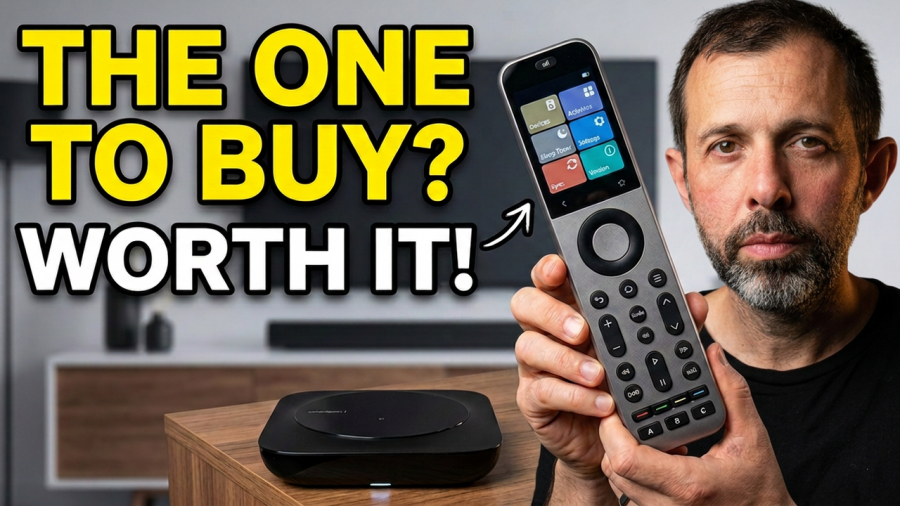
If you’ve got a living room full of gadgets and a coffee table buried under three or four remotes, you’ve probably looked at universal remotes before. I’ve spent the last few weeks living with the Sofabaton X2, and I wanted to put together a proper, warts-and-all review covering the price, the design, the setup process, and whether the Home Assistant integration everyone talks about is actually worth the hassle.
Straight away, I’ll say this: if you just want a simple, affordable universal remote, the Sofabaton X2 probably isn’t it. It’s stacked with features, which also means it comes with a price tag to match. If simple and cheap is what you’re after, it’s worth looking at Sofabaton’s other, more basic remotes, or the Switchbot Universal Remote, which I’ve been using myself for over a year.
How Much Does the Sofabaton X2 Cost?
The Sofabaton X2 will set you back around £300, and that covers the hub, the remote itself, and the charging dock. If you want to extend its reach with an IR repeater, that’s an extra £30 or so on top.
The repeater lets you control your IR devices from further away, or even from another room entirely. Think turning your air conditioning on before you’ve walked into the room.
Sofabaton X2 Specs and Features
This thing can control a genuinely huge number of devices. On paper, the Sofabaton X2 supports up to 49 IR, Bluetooth and WiFi devices, and adding the Sofabaton IR Repeater extends that coverage into bigger spaces or additional rooms.
There’s a massive built-in device library, so setup is usually painless, but you can also create fully custom remotes if your gear isn’t listed. During testing I got my Apple TV working over Bluetooth straight out of the box, added my Samsung TV without any fuss, and built a custom remote for my speakers from scratch.
It’s not just TVs either. The X2 will happily work with:
- Roku and other WiFi streaming boxes
- Xbox and PS5 consoles
- Android TV boxes
- Philips Hue and Sonos systems
Sofabaton claims support for over 500,000 devices in total, and from my experience the IR coverage is genuinely strong even without the extenders or the separate repeater plugged in.
On the hardware side, you get a 2.4 inch HD touchscreen, and both the remote and the hub have their own IR transmitters. The hub also ships with two plug-in IR extenders to squeeze the most range out of it.
One of the nicer touches is one-touch activities. Set one up once and you can have the remote turn on your TV, switch the input, and dim your lights with a single tap. There’s also an app for controlling devices from your phone or building out custom remotes, plus an API for activities that plays nicely with Siri Shortcuts or Home Assistant if you want to build your own automations.
Sofabaton X2 and Home Assistant
This is where the Sofabaton X2 gets genuinely interesting, and also where things get a bit more technical. There are two main routes into Home Assistant, and which one you pick depends on what you’re trying to achieve.
The official route is the yomonpet/ha-sofabaton-hub integration, built specifically for the X2. You’ll need this alongside an MQTT broker add-on such as Mosquitto to trigger Home Assistant automations from the remote. This integration also exposes the hub’s power controls to Home Assistant.
The alternative is an unofficial integration called Sofabaton X, which exposes all the on-device buttons to Home Assistant rather than just the hub controls. I’ve tried both, and worth flagging that this second integration is still being made fully compatible with the X2 at the time of writing.
Battery life on the remote itself is rated at up to 30 days depending on how much you use it, though realistically you’ll probably just dock it between uses since it comes with a charging dock anyway. One thing I did notice missing is a ‘find my remote’ feature, something the cheaper Switchbot Universal Remote actually includes. Oddly enough, if you expose the X2 to Home Assistant through the third-party integration, you do gain a find button that makes the remote beep, so there’s a workaround if you’re willing to set it up.
Sofabaton X2 Design
The hub itself is plain, flat, and black, which honestly works in its favour since the IR extenders mean you can tuck it out of sight behind your TV unit. The Sofabaton IR Repeater, on the other hand, has a more distinctive dome shape, a bit like a smaller version of the Europa Park dome, and since you’re more likely to place this one somewhere visible for better coverage, it’s a nice-looking bit of kit rather than just another black box.
Then there’s the remote and its dock, which is really the main event here. The dock is silver, has a small light on the front, and charging contacts that make it easy to just drop the remote back in place without losing it.
The remote itself is noticeably weighty, which sounds like a small thing but actually makes it feel properly premium in the hand. The base has both the charging contacts and a USB-C port for topping up manually. The physical buttons all protrude nicely and have a satisfying click to them, while the touchscreen up top is responsive and colourful. Silver trim runs around the edges, broken up at intervals, and the rear is a black, slightly grippy material. It’s not a reinvention of the wheel, but it’s a genuinely good-looking remote.
Setting Up the Sofabaton X2
Setup is straightforward for the basics and gets progressively more involved the deeper you go. You start by plugging in the hub and remote and downloading the Sofabaton app, then follow the in-app steps to add your devices.
There will likely be a firmware update to work through first. Like a few other reviewers, I found the hub temporarily vanished from the app after updating. Closing and reopening the app fixed it straight away.
For IR devices, you can either search the built-in library or manually teach the remote a command. My TV was found instantly through the library. For my speaker remote, I had to use the learning feature instead, which just meant selecting the command in the app and pointing my old remote at the hub. That process takes longer if you’re teaching it a remote with a lot of buttons.
My Apple TV was a slightly different process again, set up in the app first and then paired as a Bluetooth remote through the Apple TV’s own Bluetooth settings.
The trickiest part by far was the Home Assistant setup. I won’t walk through every step here, but if you want the remote to control devices inside Home Assistant, you’ll need an MQTT broker running alongside the Sofabaton integration, then configure commands in the app that trigger automations when the API is called with the right payload. It’s doable, but it’s not a five-minute job.
Using the Sofabaton X2 Day to Day
Day to day, using the remote is simple. You tap the device you want on the touchscreen, and the screen wakes automatically when you pick it up, while the physical buttons stay active the rest of the time so you can grab the volume without waking the screen at all.
The touchscreen itself responds quickly. One tap selects a device, a second tap takes you into its sub-menu of buttons, and the physical buttons underneath make it easy to back out again. There’s an off button at the top, though I’d have liked the option to program it as a proper power button for other functions too.
You can also control everything through the Sofabaton app on your phone, but the interface feels a little clunky, so I doubt you’ll use it much once the physical remote is set up.
The real value here isn’t just combining your remotes into one device, it’s the advanced features layered on top. Using the app alongside MQTT, I’ve set up toggles for my blinds, my vacuum, and my living room lights, all running through Home Assistant from the remote itself. It works reliably once it’s configured, even if getting there took some patience.
Activities are where this really shines. You can combine controls from multiple devices into a single button, so a “movie night” activity might turn on the TV, switch input, close the blinds, and dim the lights all at once. These can be fired straight from the remote’s home screen or assigned to a key, which is a feature not every universal remote bothers to include.
The third-party Sofabaton X integration for Home Assistant is arguably the better of the two options, since it exposes the physical buttons for genuine two-way control, including your saved activities. In practice, I’ve found running both integrations together works best. This one installs through HACS and comes with its own dashboard cards, including an admin panel for configuring WiFi and event commands, backup options, and hub settings, plus a dedicated remote card.
There’s also a neat trick with the API. Activities can be triggered via a web URL, so I’ve set up quick volume up and down shortcuts that press the button four times in one go. I’ve hooked these into Siri Shortcuts for quick access from my phone’s home screen. One thing worth knowing: when you copy a URL from the Sofabaton app, it doesn’t automatically encode spaces, so you’ll need to manually swap any space for %20 to get it working.
What’s in the Box
- Sofabaton X2 remote
- Charging dock
- Hub
- Power bricks and USB-C to USB-A cables
- Two plug-in IR extender cables for the hub
If you buy the Sofabaton IR Repeater separately, that comes with its own power brick and USB-C to A cable.
Sofabaton X2 Downsides
Two things hold this remote back a little. First, while it’s marketed heavily on its Home Assistant integration, actually getting that set up is not a simple task, and this is really a product aimed at people comfortable with a bit of technical fiddling. The documentation for the Home Assistant and MQTT setup isn’t great, and you’ll need patience to get through it.
Second, the Sofabaton app itself lets the side down. It’s functional, but it feels a bit clunky and not especially well designed in places.
Verdict: Should You Buy the Sofabaton X2?
The Sofabaton X2 is a high-quality remote packed with features that can genuinely control almost everything in your living room. But its biggest strength is also its biggest weakness: all that flexibility makes it more complicated to set up than most people will want to deal with. If you just need to bring a handful of remotes into one place, the Switchbot Universal Remote is simpler and more affordable.
Whether the Sofabaton X2 is right for you really comes down to what you want it to do and how comfortable you are getting technical. There are decent tutorials out there to help, but don’t go in expecting a plug-and-play experience if you want to unlock the Home Assistant side of things.
Frequently Asked Questions
How much does the Sofabaton X2 cost?
The Sofabaton X2 costs around £300 for the remote, hub and charging dock. The optional Sofabaton IR Repeater costs roughly £30 extra.
Does the Sofabaton X2 work with Home Assistant?
Yes. You can connect it via the official ha-sofabaton-hub integration with an MQTT broker, or through the unofficial Sofabaton X integration installed via HACS, which exposes more of the remote’s buttons for two-way control.
How long does the battery last?
Sofabaton rates the X2 remote at up to 30 days per charge depending on usage, though most people will simply keep it on the included charging dock between uses.
Is the Sofabaton X2 easy to set up?
Basic setup, adding TVs, streaming boxes and consoles, is straightforward. Setting up the Home Assistant integration is considerably more involved and best suited to more technical users.
