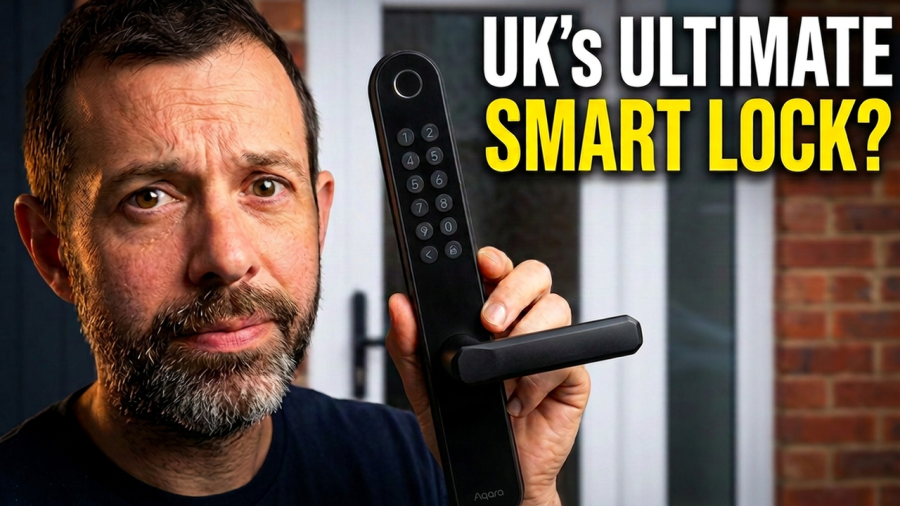
I’ve had the Aqara U600 fitted to my back door for about a month now, and I’ll be honest, I like it more than I expected to. It’s a smart lock made for UK multipoint lift-to-lock doors, it supports Apple Home Key, and instead of sitting over your existing hardware it replaces your handles and cylinder altogether.
Smart locks for UK doors aren’t new. The Yale Conexis has been around for years (with some very mixed reviews), and I tested the Simpled Smart Lock a while back. What’s different now is that Aqara has two locks that work on UK multipoint doors and support Apple Home Key: the Aqara U600 and the Aqara U200. That’s still a pretty short list.
The Aqara U600 launched at around £230, which is roughly £30 more than the Aqara U200.
Disclosure: Aqara sent me a review unit, so I didn’t pay for this lock. They didn’t see this review before it went live and had no input on what I’ve said. Some links in this post are affiliate links, which means I may earn a small commission if you buy through them, at no extra cost to you.
Quick verdict
It’s a solid, reliable smart lock that’s easy for the whole family to use, and it’s one of the few UK multipoint options with Apple Home Key. The main thing to get your head around is that it always reports as locked, even when the door is open.
What I like
- The fingerprint scanner is fast and still works in the rain
- Matter over Thread, Apple Home Key and Aliro support, so it works with most smart home platforms
- The outside handle is locked by default, even if you forget to lift the handle
- Locking and unlocking is quick and quiet
- In most cases you won’t need to drill any new holes
- Emergency key and USB-C power if the batteries die
What I don’t like as much
- It shows as locked even when the door is standing open
- I had to widen my existing holes slightly to fit it
- Remote features in the Aqara app need a separate hub
- No independent security certifications yet
Design and build quality
This lock replaces both your inside and outside handles, and it looks good. It’s black, fairly minimal and feels modern without being flashy.
On the inside you get a battery cover and a lock button. On the outside there’s a keypad and a fingerprint scanner, plus a slot at the bottom for the emergency key.
The body is mostly metal and it feels properly well made. After a month of daily use on a back door that gets opened a lot, it’s holding up well with no signs of wear so far.
Features and smart home compatibility
Apple Home Key, Matter and Aliro
The U600 uses Matter over Thread and is Aliro ready. In plain English, that means it works with Apple Home Key and with whichever Matter platform you already use, including Apple Home, Google Home, Amazon Alexa, SmartThings and Home Assistant. Aliro digital keys also work with Samsung Wallet, so Android users aren’t left out.
Ways to unlock
- Fingerprint
- Keypad passcode
- Apple Home Key (tap your iPhone or Apple Watch)
- Aliro digital key via Samsung Wallet
- Aqara NFC Card
- The Aqara app
- The emergency physical key
You can add passcodes remotely through Apple Home too, but for that you’ll need an Apple home hub such as an Apple HomePod mini or Apple TV 4K.
If you want scene automations and remote locking and unlocking inside the Aqara app itself, you’ll need an Aqara hub. The Aqara Hub M3 is the more capable option, and the Aqara Hub M100 is the cheaper one.
Batteries and weatherproofing
It runs on four AA batteries, which Aqara says should last up to 10 months. You’ll get an alert when the battery drops below 20%, and if you do get caught out, you can use the emergency key or plug a USB-C power source into the outside to give it enough power to open.
It’s also IP65 rated, which is what you want for something that lives on the outside of your house through a British winter.
Will it fit my door?
The U600 is compatible with most UK lift-to-lock multipoint doors that fall within these measurements:
- Backset: 35 to 70mm
- Centre distance: 72 to 92mm
- Door thickness: 40 to 80mm
The handle direction can be switched, so it works on both left and right hung doors.
One important point: the lock can secure the outside handle without your multipoints being engaged, but you should still lift the handle to throw the multipoints for proper security. No smart lock on the market can do that bit for you yet.
Installing the Aqara U600
This lock replaces your existing cylinder, and the inside and outside handles are mechanically separate. The upshot is that you should be able to fit it without making any new holes in your door.
Here’s roughly how it went for me:
- Check the installation guide in the box to make sure your door is compatible.
- Remove your existing cylinder and both door handles.
- Follow the instructions to test that the new handle can open your door.
- Set the spindle holder so it faces the opposite way to your handle.
- Fit the outside part. It has a couple of wires that go through the old cylinder hole, plus two adjustable posts with screws that line up with your existing handle holes.
- From the inside, connect the screws, pop the cap on and put the batteries in.
- Pair it in the Aqara app.
The only snag I hit was that the rounded parts on the handle were a little wider than my existing holes, so I had to open them up slightly. It’s not a big job, and it wouldn’t stop me putting a normal handle back on if I moved house.
Pairing was really easy. There’s no calibration step, and it went straight into Apple Home without any fuss, with Home Key set up right away. Fingerprints and passcodes are added in the Aqara app, and you can add passcodes in Apple Home as well.
Overall it’s a simple install. It’s not quite as easy as the Aqara U200, which is a retrofit lock that keeps your existing cylinder, but it was a lot easier than the Simpled Smart Lock.
What it’s like to live with
Day to day, it’s very easy to use. I’ve had it on my back door (the Aqara U200 is on my front door) and I’ve tried every entry method. Even in the rain, the fingerprint scanner reads quickly. For me, fingerprint and Home Key are the easiest ways to use a smart lock, and this one backs that up.
Getting out is simple. You just push the inside handle down. There’s no unlocking step, because the two handles aren’t connected.
That design choice has a few knock-on effects, and most of them are good:
- The door is effectively locked from the outside by default, even if the multipoints aren’t engaged.
- If you forget to lift the handle, the door is still locked.
- You don’t get the jam errors retrofit locks can throw when they try to lock and something’s out of line.
- It’s quick and quiet, because there’s no motor turning a key in a cylinder.
The one thing that takes getting used to
Because “locked” here really means “the outside handle doesn’t work”, the lock will report as locked unless you’ve unlocked it from the outside or the app. Open the door from the inside and walk out, and it still says locked.
From a security point of view, that’s fine. But if you’re the sort of person who occasionally leaves the back door ajar, it’s worth adding a contact sensor such as the Aqara Door and Window Sensor P2 so you actually know when the door’s open. Coming from other smart locks, it’s mostly a change of mindset.
You can also set it to auto lock a set time after it’s been unlocked, which I found really handy.
Is the U600 secure?
This is the question that matters, because it’s the thing protecting your house.
It meets all the requirements for Apple Home Key and communication is encrypted. It’s also been tested against Tesla coil attacks and electromagnetic interference, so it can’t be forced open that way. That’s reassuring, especially as this is a lock that makes it pretty obvious from the street that you’ve got a smart lock.
Passcodes are optional. If you use them, longer is better.
What about the letterbox?
People always ask whether someone could open a smart lock through the letterbox. With this one, probably yes, because the inside handle opens the door with a single push. Unless your letterbox has a secure design or a Letterbox Cage on the inside, I wouldn’t fit this to a door with a letterbox.
And smashing the glass?
Also probably yes. But this question always baffles me a bit with smart locks, because the same is true of any door with a thumb turn. By the time someone’s smashed your door glass, they’re getting in regardless of the lock, and that’s forced entry. The same goes for someone applying a lot of force to the outside handle. These are things to think about with every lock, not just smart ones.
I would like to see Aqara go after some independent security certifications for this lock. It would give more security-conscious buyers extra reassurance, and it may well happen.
Verdict: should you buy the Aqara U600?
After a month of use, I think the Aqara U600 is a solid, reliable smart lock. The fingerprint reader and keypad make it easy for less techy family members and guests, and Apple Home Key works just as well for everyone else.
I like the design a lot, and I like that the outside handle is locked before you’ve even lifted the handle to engage the multipoints. Auto lock is a nice extra too.
If you’re not keen on a lock without a cylinder, take a look at the Aqara U200 instead. It’s been on my front door for a long time now and I rate it highly.
Aqara U600 FAQs
Does the Aqara U600 work with UK multipoint doors?
Yes. It’s designed for UK lift-to-lock multipoint doors with a backset of 35 to 70mm, a centre distance of 72 to 92mm and a door thickness of 40 to 80mm.
Does the Aqara U600 support Apple Home Key?
Yes. It supports Apple Home Key and is Aliro ready, so digital keys also work with Samsung Wallet.
Do I need a hub?
Not for basic use. For remote passcodes in Apple Home you’ll need a home hub like an Apple HomePod mini or Apple TV 4K. For automations and remote control in the Aqara app, you’ll need an Aqara hub such as the Aqara Hub M3 or Aqara Hub M100.
How long do the batteries last?
Aqara says up to 10 months from four AA batteries. You’ll get a warning at 20%, and you can use the emergency key or USB-C power if they run flat.
Does it lock the multipoints for me?
No. You still need to lift the handle to engage the multipoints. No smart lock can do that automatically yet, although the U600 does keep the outside handle locked even if you forget.
Will I need to drill new holes?
Usually not, as it uses your existing cylinder and handle holes. I did need to widen mine slightly for the handle’s rounded fittings.
