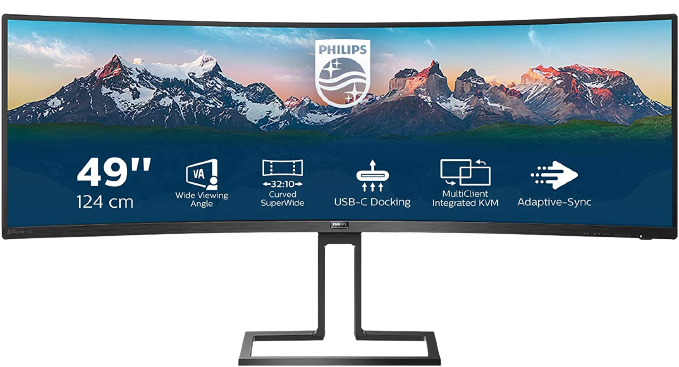
Philips Brilliance 499P 49″ Superwide Curved Monitor
If you’re seeking a display with high build quality that performs really well, then the Philips Brilliance 499P 49″ superwide curved monitor is an excellent choice. It offers comfort during use, makes content look great, and provides ample screen real-estate for productivity tasks. For those who rely on webcams daily or want a more budget-friendly setup initially, we recommend opting for the Philips Brilliance 498P at its lower price-point to save money while investing that cash in an external webcam instead.
When it comes to choosing monitors you’re spoilt for choice and with so many buzz-phrases like refresh-rate, wide, superwide etc out there making a choice can be hard. When it comes to a large monitor to maximise your productivity the Philips Brilliance 499P or Philips Brilliance 498P Superwide Curved Monitor option can really fit that bill.
Curved Design and Stand Options
The 499p is a beautifully designed curved monitor with slim bezels around the edges and a pop-up webcam on top which can be retracted for privacy. Alongside a huge selection of cables you also get a solid metal stand in the box which can tilt and adjust height. The curve and beautiful display make this monitor look amazing on any desk as well as giving you plenty of screen space to play with.
Screen Specifications and Visual Performance
The rest of the monitor specifications can be split into 2 categories, specifically looking at the display inputs versus visual output. With tons or ports and inputs, including USB-C, 2 HDMI and a DisplayPort input this monitor is packed with features available on modern workstations. The Screen Boasting a massive 49″ display with a maximum ratio of 5120 by 1440 this Quad HD LCD display looks stunning across the board.
The monitor has a brightness of 450 cd/m2, 3000:1 contrast ratio and an impressive 120hz refresh rate which makes everything super-smooth to use. The monitor itself has those curved edges to bring the edges closer to you which makes it more comfortable to use for extended sessions. Additionally, the anti-glare mode performs better than other monitors I’ve used previously which is great if you work near a window where light conditions fluctuate. Finally, there’s a whole variety of display modes and options available that can be customised as needed.
One must-have feature included here is an anti-blue-light mode which helps protect your eyes from strain over long periods, offering protection often offered by the Brilliance 499P and 498P monitors specifically. The rest of our experience involves checking how this holds up during daily workloads to verify if it can replace or augment a standard setup.
Built-in Audio, Docking and Webcam Features
A retail price of £1000 for the 499P and £850 for the 498P monitors indicates these are not cheap however they pack in a lot of extras as well as just being incredibly well-made displays. Built in Speakers These monitors have a pair of 5W built in speakers at the base of the monitor which sit quietly.
These speakers aren’t going to blow you away but sound better than we expected and are completely functional for tasks where you need audio such as editing video, holding calls or even just background music when required. Powered USB Dock With a range of ports including ethernet and USB connections the built in powered dock is great if you have chargers on your desk or IR receivers for wireless mice.
Built-in Webcam (499P only): The build in webcam is a 2 megapixel full HD camera with an accompanying microphone that works well enough. This camera can have its angle adjusted and it completely tucks inside the body of the monitor for privacy when not being used on calls or video conferences.
The disappointing thing about this monitor currently resides within the built in webcam which, even in good lighting scenarios looks grainy compared to higher quality external options. That is a significant factor at this price point where we’d have liked to see much higher quality camera hardware included by default from Philips themselves.
Daily Usage and Workflows
We’ve been using this monitor as our daily display for an average of 7 hours usage every day over the last week or so and it has proven itself a brilliant superwide tool. The massive screen gives enough space for at least three full size windows which is great if you want to reference several applications running simultaneously without cluttering up your desktop.
In our specific testing we’ve used this primarily for editing music in Logic Pro X with various plugins open alongside one another, while also creating a website using standard web browser software. We had design files and code editors running at the same time as well as writing content directly on this site with notes and specs visible alongside article editor interfaces.
The display brightness is plenty adequate for any indoor environment, anti-blue light modes effectively protect our eyes during evening work sessions, and antiglare performs incredibly well in various ambient lighting. As mentioned previously regarding the audio system, built-in speakers are fine for everyday tasks but we still use HomePod mini for background music because overall sound quality there remains better than integrated options.
Frequently Asked Questions
We’ve heard some people ask about choosing between these models or whether external cameras really matter. Our conclusion is that you can purchase the monitors using our standard links to Amazon where they stock both Philips 499P on their listings and also the Philips 498P for comparison purposes.
